Tag & Timber

Trail cameras · Memory cards

Best SD Cards for Trail Cameras

The cheapest part of a trail-camera setup is the one that decides whether you get the photos at all. Capacity limits, speed class and the swap routine, sorted out.

By Stephen V.Last updated How we pick

A trail camera that will not read its card is indistinguishable from a trail camera that is broken, and the number of hunters who conclude the camera is faulty when the card is the problem is not small. Almost all of it comes down to one specification almost nobody reads.

The SD Association defines four capacity classes, and the boundary that matters is at 32GB. SDHC covers more than 2GB up to 32GB and uses FAT32. SDXC covers more than 32GB up to 2TB and uses exFAT. They are different file systems, and a camera whose manual says “32GB maximum” is telling you it reads SDHC only — a 64GB card in that camera will not mount, no matter how good the card is.

So we ranked these on format and capacity against what cameras actually accept, speed class matched to stills or video, and price per card— because the real upgrade here is owning enough cards to swap rather than stand at the tree reading a screen.

How this is funded:we earn a commission if you buy through our links, at no extra cost to you. It never changes which product we recommend, and we’ll tell you plainly when to skip one. Full disclosure.

Quick picks

Ranked on published specs, package value and buyer fit. Select a row to jump to the full write-up. We have not tested these products — here is exactly what we do instead.

#ProductBest forPrice
1
SanDisk Ultra 32GB SDHC 100MB/s

SanDisk Ultra 32GB SDHC 100MB/s

The sensible default for a camera taking still photos, which is most of them. It is a real SanDisk card at a price that lets you buy one per camera, and one card per camera is the actual upgrade — swapping at the tree beats standing there scrolling a screen.

Best overall
$20.49 · View on Amazon

$22.147% off

Price as of August 22, 2026. #ad How we’re funded

2
SanDisk Extreme PRO 32GB SDHC UHS-I

SanDisk Extreme PRO 32GB SDHC UHS-I

A V30-rated card in the capacity most trail cameras are happiest with. The speed rating is overkill for still photos and exactly right for video, which is where cheap cards actually fail — a camera shooting 30-second clips writes far more data per trigger than one taking three stills.

Best for video
$28.99 · View on Amazon

Price as of August 22, 2026. #ad How we’re funded

3
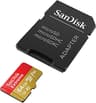
SanDisk Extreme 64GB microSDXC with adapter

SanDisk Extreme 64GB microSDXC with adapter

The one to buy if your camera takes microSD, or if you want a card that works in both a microSD camera and a full-size slot via the bundled adapter. Check the manual for a stated maximum capacity first — plenty of older cameras cap out below 64GB.

Best for microSD cameras
$33.98 · View on Amazon

Price as of August 22, 2026. #ad How we’re funded

4
HME 32GB SD card, 2-pack

HME 32GB SD card, 2-pack

Two full-size cards for roughly the price of one premium single, which is the right shape for how trail cameras actually get run: one card lives in the camera, one lives in your pocket, and you swap rather than stand in your own scent reading a screen.

Best multi-pack
$24.40 · View on Amazon

$26.799% off

Price as of August 22, 2026. #ad How we’re funded

5
SPYPOINT 32GB microSD with adapter

SPYPOINT 32GB microSD with adapter

A card sold by the camera maker, in the capacity its own cameras are specified for. You pay a small premium over a generic card for the removal of one variable — if a SPYPOINT will not read it, the card is not the reason.

Best brand-matched
$26.99 · View on Amazon

Price as of August 22, 2026. #ad How we’re funded

The picks in full

#1Best overall

SanDisk Ultra 32GB SDHC 100MB/s

The sensible default for a camera taking still photos, which is most of them. It is a real SanDisk card at a price that lets you buy one per camera, and one card per camera is the actual upgrade — swapping at the tree beats standing there scrolling a screen.

Strengths

  • Cheap enough to leave a spare in every camera housing
  • 32GB SDHC is the most universally compatible trail-camera format
  • From a manufacturer whose cards are actually what the label says

Trade-offs

  • Not speed-rated for sustained high-bitrate video
  • Full-size only — no microSD flexibility if you switch camera brands
FormatSDHC (full-size SD)
Capacity32GB
Speed classC10
Read speedUp to 100MB/s

Worth knowing. Counterfeit memory cards are common enough that capacity-testing a new card before it goes in a camera is worth the ten minutes.

Specs read from the product listing, on August 22, 2026. “Not published” means the manufacturer does not state that figure.

#2Best for video

SanDisk Extreme PRO 32GB SDHC UHS-I

A V30-rated card in the capacity most trail cameras are happiest with. The speed rating is overkill for still photos and exactly right for video, which is where cheap cards actually fail — a camera shooting 30-second clips writes far more data per trigger than one taking three stills.

Strengths

  • V30 / U3 speed class sustains video writes without dropped clips
  • 32GB SDHC is the format the widest range of cameras accepts
  • Full-size SD — no adapter to work loose in a damp housing

Trade-offs

  • You are paying for write speed a photo-only camera will never use
  • 32GB is small if you shoot video and check the camera twice a season
FormatSDHC (full-size SD)
Capacity32GB
Speed classC10 / U3 / V30
Read speedNot published

Worth knowing. SDHC tops out at 32GB by specification. If your camera's manual lists a 32GB maximum, that is why — it reads SDHC only, and an SDXC card of 64GB or more will not mount.

Specs read from the product listing, on August 22, 2026. “Not published” means the manufacturer does not state that figure.

#3Best for microSD cameras

SanDisk Extreme 64GB microSDXC with adapter

The one to buy if your camera takes microSD, or if you want a card that works in both a microSD camera and a full-size slot via the bundled adapter. Check the manual for a stated maximum capacity first — plenty of older cameras cap out below 64GB.

Strengths

  • Ships with a full-size SD adapter, so one card covers both slot types
  • V30 / A2 rating handles video and rapid burst sequences
  • 64GB means a full season of stills without a card swap

Trade-offs

  • SDXC — older cameras that read SDHC only will not mount it
  • The adapter is one more thing to lose in the leaves at dusk
FormatmicroSDXC (+ SD adapter)
Capacity64GB
Speed classC10 / U3 / V30 / A2
Read speedUp to 160MB/s

Worth knowing. SDXC cards are formatted exFAT from the factory. If a camera refuses one, formatting the card IN the camera rather than on a computer fixes it more often than not.

Specs read from the product listing, on August 22, 2026. “Not published” means the manufacturer does not state that figure.

#4Best multi-pack

HME 32GB SD card, 2-pack

Two full-size cards for roughly the price of one premium single, which is the right shape for how trail cameras actually get run: one card lives in the camera, one lives in your pocket, and you swap rather than stand in your own scent reading a screen.

Strengths

  • Two cards per pack — the cheapest way to build a swap rotation
  • Full-size SDHC, the widest-compatibility format
  • Sold into the hunting market, so 32GB matches typical camera limits

Trade-offs

  • Speed class is not published — treat as photo duty, not video duty
  • Not a memory specialist's card; buy a name brand for video cameras
FormatSDHC (full-size SD)
Capacity32GB
Quantity2-pack
Speed classNot published

Worth knowing. The swap routine matters more than the card: pull the card, drop in the spare, walk away. Every extra minute at the camera is scent left at a spot you want deer using.

Specs read from the product listing, on August 22, 2026. “Not published” means the manufacturer does not state that figure.

#5Best brand-matched

SPYPOINT 32GB microSD with adapter

A card sold by the camera maker, in the capacity its own cameras are specified for. You pay a small premium over a generic card for the removal of one variable — if a SPYPOINT will not read it, the card is not the reason.

Strengths

  • Sold and specified by the camera manufacturer for its own cameras
  • microSD plus adapter covers both SPYPOINT slot types
  • 32GB stays inside the capacity limit older models publish

Trade-offs

  • Costs more than an equivalent card from a memory manufacturer
  • Speed class is not published on the listing
FormatmicroSD (+ SD adapter)
Capacity32GB
Speed classNot published
Read speedNot published

Worth knowing. Brand-matched cards are the one case where paying extra is defensible — not because the card is better, but because it removes the camera maker's first support answer.

Specs read from the product listing, on August 22, 2026. “Not published” means the manufacturer does not state that figure.

Capacity: why 32GB keeps showing up

Thirty-two gigabytes is not a marketing convention, it is where one standard stops and the next begins. The SD Association’s own capacity table sets SDHC at more than 2GB up to 32GB on FAT32, and SDXC at more than 32GB up to 2TB on exFAT. A camera built to read SDHC has no exFAT support, so a 64GB card is not a bigger version of the same thing to it — it is an unreadable format.

Practically: find the maximum capacity in your camera’s manual and treat it as a hard limit. If it says 32GB, buy 32GB. If it says 512GB, you have an SDXC camera and the world is open. And if a new card refuses to mount, format it in the camera before you decide the card is dead — a computer will happily write a file system your camera cannot read.

How much is 32GB in photos?

More than a season, for a stills camera on a normal trail. Card capacity is almost never what fills up first; batteries usually run out before the card does. Video is a different story, and it is the reason the speed class below matters.

Speed class: only video cameras care

The letters and numbers on a card — C10, U3, V30, A2 — describe sustained write speed. A camera writing three still images per trigger is asking almost nothing of a card. A camera writing a 30-second 1080p or 4K clip is asking a great deal, and a slow card responds by dropping frames, truncating the clip, or simply failing to write it.

  • Stills only. C10 is plenty. Buy the cheap real-brand card and spend the difference on a second one.
  • Video, any resolution. Look for U3 or V30. This is the one case where the more expensive card does something you can see.
  • Cellular cameras. The card is buffering images before transmission rather than being read by you. Follow the manual’s capacity limit and do not over-buy speed.

Buy more cards, not bigger ones

Here is the part that has nothing to do with the card and everything to do with killing a deer. Every minute you spend standing at a camera is scent left at a spot you have chosen precisely because deer use it. Scrolling through images on the camera’s screen, or plugging in a viewer and squinting at it, can easily take ten minutes.

Own one card per camera plus one spare in your pocket. Walk in, open the housing, pull the card, drop in the spare, close it, walk out. Ninety seconds. You look at the photos at home, in the warm, on a screen you can actually see, and the site stays as clean as your boots allow. This is why the two-pack is on this list and why the expensive single card is not the top pick.

Test a new card before it goes on a tree

Counterfeit and over-reported cards exist. Before a card goes into a camera that will sit on a tree for six weeks, copy enough data onto it to fill it and read it back. Ten minutes at a desk is cheaper than discovering in December that a whole rut’s worth of photos never wrote.

Handling and storage

Cards fail from three things in the field: condensation inside a housing, being removed while the camera is still writing, and physical damage from being carried loose in a pocket with keys. All three are avoidable. Power the camera off before you pull a card, carry cards in a small hard case, and make sure the housing gasket is seated and clean when you close it.

If a card starts producing corrupted images, retire it. A card that has begun to fail does not recover, and it is the cheapest thing on the tree to replace. The camera, the lock, the batteries and the location are all worth more than the card that lost the photos.

Frequently asked questions

What size SD card should I use in a trail camera?

Whatever the camera's manual states as its maximum, and usually that is 32GB. The SD Association defines SDHC as more than 2GB up to 32GB and SDXC as more than 32GB up to 2TB, and they use different file systems. A camera that reads SDHC only will not mount a 64GB SDXC card at all. Card capacity is rarely the limiting factor anyway — batteries almost always run out first.

Why won't my trail camera read my SD card?

In order of likelihood: the card is larger than the camera's stated maximum, so it is the wrong format entirely; the card was formatted on a computer with a file system the camera does not read; the contacts are dirty; or the card has failed. Format the card in the camera itself before concluding anything. That single step fixes most of these.

Do I need a fast SD card for a trail camera?

Only if the camera records video. Stills are a trivial write load and a standard C10 card handles them without effort. Video is a sustained write, and a slow card responds by dropping frames or failing to save the clip — look for a U3 or V30 rating if you shoot video.

Should I use microSD or full-size SD in a trail camera?

Use whichever your camera has a slot for. Cameras with a full-size slot are slightly better off with a full-size card because there is no adapter to work loose in a housing that gets damp and cold. If you own both types of camera, a microSD card with a bundled adapter covers both.

How many SD cards do I need?

One per camera plus at least one spare. The spare is the point: it lets you swap the card and walk away in ninety seconds rather than standing at your best trail for ten minutes reviewing photos on the camera screen. Every minute there is human scent left at a spot you want deer to keep using.

Can I reuse an old SD card from a phone or camera?

Yes, if the capacity is within your trail camera's limit and you format it in the camera first. Check it properly before you trust it, though — a card that has already lived a full life in a phone is closer to failure than a new one, and a card failure in the woods is invisible until you get home.

Sources

Keep reading